Help
Projects
Projects is a lightweight project management tool built for small teams. Organise work into epics and stories, track progress on a kanban board, and plan timelines — all without leaving SquirrelStack.
Epics
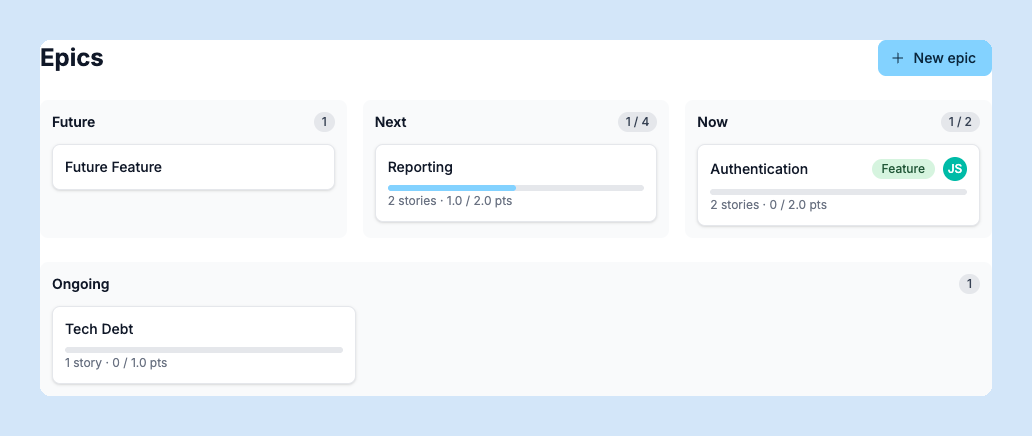
Epics are large pieces of work that contain multiple stories. Use them to group related features, initiatives, or milestones. Each epic shows its progress based on how many of its stories are complete. You can reorder epics and mark them as done when all work is finished.
Stories
Stories are individual tasks or work items. Each story belongs to an epic and has a title, description, status, assignee, and priority. Add notes for discussion and checklists to break work into smaller steps. Stories can be moved between epics or reordered within them.
Board
The kanban board gives you a visual view of all stories grouped by status column. Drag stories between columns to update their status. Use the board for daily standups or to get a quick picture of what’s in progress.
Timeline
The timeline view shows epics and their stories on a Gantt-style chart. Use it to plan work across weeks and see how initiatives overlap. Epics with start and end dates appear as bars on the timeline.
Checklists
Break stories into smaller steps with task checklists. Check off items as you go — the story shows a progress indicator based on completed tasks. Reorder tasks by dragging them.
Project Metrics
The metrics page shows charts and stats for your project — stories completed over time, velocity trends, and work distribution across team members. Use it to understand throughput and identify bottlenecks.